



-
When Connecting Your Earbuds Fails – Pairing Issues
-
How to Connect Earbuds to Your Phone (iPhone and Android)
-
How to Connect Bluetooth Headphones to a Laptop
-
Why Your Earbuds Won't Connect and How to Fix It
-
Seamless Pairing and Perfect Fit with Modern Earbuds
-
Connecting Your Earbuds Should Be Effortless
-
Frequently Asked Questions
There are a few things that are as annoying as missing the connection at King's Cross St. Pancras, loud conversations, or playing music out loud, and on top of that list is when you just can't get your pair of earbuds to pair. You're staring at the Bluetooth screen, waiting for something, anything, while they stay invisible to your device. Knowing how to connect earbuds smoothly saves you from losing your mind during the morning commute.
The good news, or rather great news, is that once you get the hang of it, it's actually quick and painless. That's why we'll walk you through it step by step, with a few handy tips along the way. Before you know it, you'll be connecting your earbuds to your phone, laptop, tablet, or whatever you're using quickly and without the hassle.
When Connecting Your Earbuds Fails – Pairing Issues
Most pairing issues are not issues at all. Rather, it comes down to small details that are sometimes easy to miss. However, once these basic steps are handled, everything else usually takes just a few seconds.
Before you risk any unwanted frustration (and frustrations are always unwanted), it's worth running a quick check. Make sure you've done the following:
-
Your earbuds are charged (ideally, the case, too),
-
Your device has Bluetooth turned on,
-
You're within range (usually around 10 metres),
-
Your earbuds are in pairing mode.
Most modern earbuds handle a lot of this automatically, but taking a moment to double-check can save you time – and a bit of stress.
How to Connect Earbuds to Your Phone (iPhone and Android)
Let's start with the usual daily scenario – you're trying to connect the earbuds to your phone. Ask yourself a couple of quick questions: Are you setting them up for the first time? Reconnecting your trusted gadgets after a reset? Are they giving you a hard time?
The most basic culprit is usually pairing. The trick is to remember that your earbuds need to be in pairing mode, so your phone can actually find them. From that point on, it should be just a few taps.

How to Pair Wireless Earbuds on iPhone
If you're using an iPhone, you're in luck because Apple always tries to keep things nice and simple. Most of the time, it's just a case of turning Bluetooth on and tapping on the earbuds from the list. There's no need to dig around or have your hands full of complicated setup.
If it's your first time connecting a new pair, it helps to know what's coming, but honestly, it's very simple. Once you've handled it the right way, your iPhone will remember the earbuds and automatically reconnect them. Here's how to do it:
-
Open Settings,
-
Tap Bluetooth,
-
Make sure Bluetooth is switched on,
-
Wait a few seconds for available devices to appear,
-
Look for your earbuds under Other Devices,
-
Tap the name to connect.
Once connected, your earbuds will move to My Devices, meaning your iPhone will remember them from now on. After that, things get much easier – next time you take them out of the case, they'll usually connect automatically within a second or two.
How Do I Pair My Earbuds on Android
Android phones can look a bit different depending on the brand, so you can be using a Samsung, a Google Pixel, or something else. But the actual pairing process is pretty much the same across the board. When you've done it once, it's quick and easy.
If this is your first time connecting a new pair, don't stress. Android does a good job of guiding you through it, and sometimes your phone will even spot nearby earbuds automatically. After that first setup, your earbuds will usually reconnect on their own whenever you take them out of the case, so it's very much a one-time thing. Here's how to pair them:
-
Go to Settings,
-
Tap Connections or Bluetooth,
-
Turn Bluetooth on,
-
Tap Pair new device (or Scan),
-
Wait for your earbuds to appear,
-
Tap to connect.
Once paired, your earbuds will be saved in your device list, so reconnecting later is quick and automatic.
How to Connect Bluetooth Headphones to a Laptop
You may need your earbuds for work calls, Zoom meetings, or a bit of Netflix on your laptop. Don't fret because connecting them is just as easy as pairing with your phone. On top of that, once it's done, your laptop will remember them for future use.
The key thing here is (again) to make sure your earbuds are in pairing mode before you start. After that, it's just a matter of selecting them from your laptop's Bluetooth menu.
Pairing on Windows
If you're using a Windows laptop, start by opening Settings and heading to the Devices section, then selecting Bluetooth & other devices. Make sure Bluetooth is switched on – this is essential. Otherwise, your earbuds won't show up at all. From there, click on Add Bluetooth or other device, choose Bluetooth, and wait a moment while your laptop searches for nearby devices. Once your earbuds appear in the list, simply select them to connect.
Pairing on Mac
On a Mac, the process is just as simple as on a Windows PC. Begin by opening System Settings (or System Preferences, depending on your version), then click on Bluetooth. Once Bluetooth is turned on, your Mac will start scanning for available devices. When your earbuds appear in the list, click Connect, and you're all set.

Why Your Earbuds Won't Connect and How to Fix It
Even the best earbuds have their off days. If yours aren't connecting, don't panic because it's usually something simple and easy to fix.
Common Issues for Earbuds
One of the most common reasons earbuds won't connect is that they're already paired with another device nearby, like your phone or laptop. Bluetooth can also sometimes be switched off without you realising (it happens more often than you'd think).
Low battery is another frequent culprit, as earbuds may not enter pairing mode properly when power is running low. And, of course, distance matters – if you're too far away from your device, the connection simply won't happen.
Quick Fixes to Pair Earbuds Easily – Troubleshooting
If your earbuds aren't playing nice, don't worry, because it's usually something simple. Yes, it's funny when you hear "Have you tried turning it off and on again," but it's often the easiest and most helpful trick.
So, try to toggle Bluetooth off and back on again to refresh the connection. If that doesn't work, try placing your earbuds back into the case for a few seconds before taking them out again. This is a simple way to restart them. You can also go into your device's Bluetooth settings, select your earbuds, and choose "Forget device," then reconnect from scratch.
It's also worth checking that no other nearby device is trying to connect automatically. This can interrupt the pairing process without you even noticing.
Seamless Pairing and Perfect Fit with Modern Earbuds
It's true that most earbuds follow a similar setup, but the way they fit can be very different. Once you've mastered pairing and the instant connection between a pair of earbuds and any devices you may want to use, it's time to think about comfort.
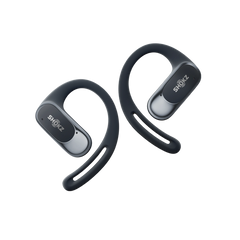
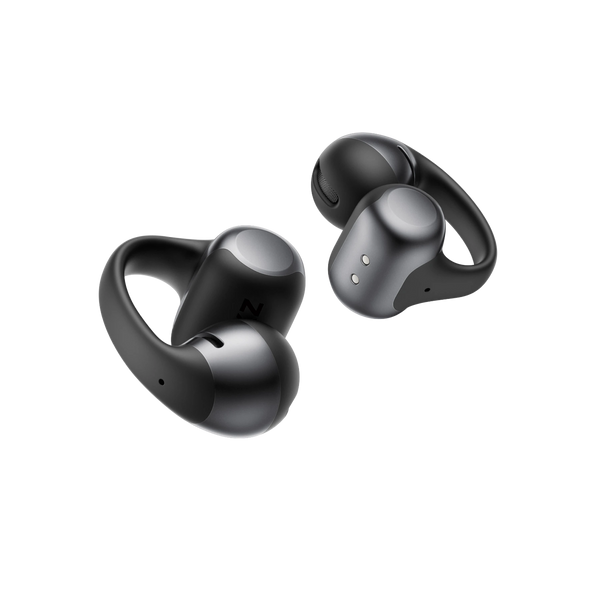
Clip-on designs, like the Shokz OpenDots ONE, use an open-ear, non-in-ear structure. Instead of going into your ear canal, they gently clip onto the outer ear and deliver sound while your ears are kept open to your surroundings. But what actually makes them different? Here's what to expect:
-
Non-in-ear design – no pressure inside the ear canal,
-
Open-ear listening – stay aware of traffic, people, and your environment,
-
Secure clip fit – stays in place without needing to be pushed in,
-
Lightweight feel – more like wearing an accessory than traditional earbuds.


How to Wear Clip-On Earbuds the Right Way
If you've never used clip-on earbuds before, they might look a bit different, but they're surprisingly intuitive. Here's a simple explanation on how to wear them:
-
Hold the earbud so the speaker sits near your ear opening,
-
Gently clip it onto your outer ear,
-
Adjust slightly until it feels secure and comfortable.
That's it – no twisting, pushing, or adjusting multiple tips. And no scouring the ground and tracing where the earbud ran away, either.
Comparing Shokz Clip-On and Open-Ear Options
|
Product |
Type |
Key Feature |
Price (GBP)* |
|
OpenDots ONE |
Clip-on open-ear earbuds |
Stylish clip-on design, interchangeable earbuds, Dolby Audio, secure JointArc™ fit, up to 40 hours of playback |
£179.00 |
|
Sony WF-1000XM5 |
In-ear earbuds |
Industry-leading ANC, high-res audio, premium sound detail |
£199.00 |
|
Bose QuietComfort Ultra Earbuds (2nd Gen) |
In-ear earbuds |
Best-in-class ANC, immersive audio, secure fit |
£299.95 |
|
OpenFit Pro |
Open-ear true wireless earbuds |
Dolby Atmos with head tracking, AI-enhanced calls, open-ear noise reduction, up to 50 hours of playback |
£219.00 |
|
OpenFit 2+ |
Open-ear true wireless earbuds |
DualBoost™ audio, Dolby Audio, physical controls, AI noise-cancelling mics, up to 48 hours of playback |
£179.00 |
|
Apple AirPods Pro (2nd generation) |
In-ear earbuds |
Apple integration, adaptive audio, spatial audio |
£219.00 |
*Prices are current to date of publication, but are subject to change
Connecting Your Earbuds Should Be Effortless
Once you know the steps, it's actually pretty simple to connect your earbuds to any device. Just keep in mind that most issues come down to simple things like Bluetooth settings, battery levels, or pairing mode.
If you're still running into problems regularly, it might be worth upgrading to earbuds designed for a smoother experience. Features like auto-pairing and intuitive design in OpenDots ONE and other Shokz Open-ear true wireless earbuds give you a simple choice. Add a reasonable price into the mix, and you've got yourself a winner. Remember, a good pick will make it easy to just press play and get on with your day, so choosing Shokz is really a no-brainer.
Frequently Asked Questions
How do I put my earbuds in pairing mode?
Usually, you can do this by taking them out of the case or holding the pairing button until the LED light flashes.
Why are my earbuds connected, but no sound is playing?
Check your device's audio output settings because your earbuds might be connected but not selected as the active audio device.
Can I connect my earbuds to multiple devices?
Some earbuds support multi-device pairing, but many connect to one device at a time. Check your model's specs.
Do Open Dots One support Multi-Device Pairing?
Shokz OpenDots ONE support MultiPoint (multi-device) pairing, meaning they can connect to two devices at the same time. You can switch between these two devices through the Shokz App.
How far can Bluetooth earbuds reach?
Most Bluetooth earbuds work within a range of about 10 metres, though walls and interference can reduce this.