





You’ve got your new clip-on earbuds, but they don't feel right just yet. Maybe they’re wobbling the second you move, or they’ve started to pinch after a few minutes. You might even find they’re sitting at a weird angle that makes the music sound muffled. The good news is the kit usually isn't the problem; it’s almost always just down to the positioning, which only takes about thirty seconds to fix.
This guide looks at how to get that fit spot on. We’ll go through the steps, point out the common faffs to avoid, and explain why getting it right is about more than just comfort.
Part 1. Why Clip-On Earbuds Fit Matters for Comfort and Ear Health
We all want our gear to be comfortable, obviously. But ear health is a big deal too, especially if your clip on earbuds are basically attached to your head all day. If they’re sitting wrong, that constant pressure starts to niggle at your ear cartilage, and you'll end up with a soreness that just won't go away. Then there’s the clamping force; if it’s too tight, it actually messes with your blood flow.
Even a slightly dodgy angle is bad news because it muffles the sound, making you crank the volume up way higher than you should. That’s a massive strain on your hearing. Getting the fit spot on isn't just about stopping the pinch; it’s about looking after your ears long-term.If your headset is seeing daily use, it also helps to know how to clean your headphones properly, because built-up sweat and grime can make irritation worse.

Part 2. How to Wear Clip-On Earbud Headphones in 5 Steps
It only takes a couple of minutes to get the hang of it. Once you’ve nailed the technique a few times, your hands just take over and you won't even have to think about it before a run.
1. Identify Left and Right
Some clip-on earbud headphones have the technology to figure out which ear they’re on by themselves. But for the rest, you’ll need to squint at the shell for an ‘L’ and ‘R’ or a tiny bit of colour coding.
It’s worth the two seconds it takes to check; if you get them swapped, the stereo balance goes all wonky. Vocals and instruments end up in the wrong layers, and the whole track just sounds a bit "off."
2. Position the Clip-On Stable Cartilage
You’re aiming for the antihelix (that firm, curved bit of cartilage just in front of your ear canal). It’s the best spot for a solid anchor. The battery section or the "tail" should sit neatly behind your ear, following the natural shape of your head.
Try to avoid clipping onto the soft lobe or the very outer edge; they’re a bit too flimsy to keep things steady when you're actually moving.
3. Align the Speaker Towards the Ear Canal
Sound quality is all about the speaker's position. You want the opening pointing directly at the entrance of your ear canal. If it’s angled too far away, the bass disappears and the music starts to sound thin and distant. You’ll know when it’s right: the audio suddenly feels a lot fuller and more "present."
4. Set Gentle, Even Pressure
The clip needs to be snug enough to stay put during a sprint, but not so tight that it starts to pinch. It’s a bit of a balancing act. Try adjusting the connecting arc, anywhere between zero and thirty degrees from the horizontal usually does the trick. You’re looking for that sweet spot where they’re secure but you can still wear them for hours.
5. Run a 30-Second Fit Test
Don’t just head out the door, give them a quick stress test first. Shake your head, give it a good nod, and maybe jog on the spot for a bit. If they’re shifting or the sound is cutting out, the fit isn't quite right yet. If everything stays put and the audio is consistent, you’re ready to go.
Part 3. Signs Your Clip-On Earbuds Are Not the Right Fit
Fit issues aren't always obvious the second you put your gear on; usually, they start to creep up once you’re a few miles in. Spotting these red flags early saves you a massive amount of faff later.
The biggest giveaway is if you’re constantly reaching up to fiddle with them. If you’re having to shift your earbuds every few minutes, something is definitely off. It might be a dodgy clip angle, or maybe the speaker just isn't lined up right. Sometimes, let's face it, the design just doesn't vibe with your ear shape. Also, if you’re feeling a proper ache, that’s just too much pressure on the wrong spot.
Then there’s the sound. If the audio feels a bit patchy or keeps changing as you move, the speaker is clearly drifting away from where it should be. And if one ear sounds louder than the other? That’s a telltale sign they aren't sitting at the same distance from your ear canal.
If the outside of your ear feels exhausted after a run, the clip is likely gripping way too hard or rubbing against the wrong bit of cartilage. In that case, you might need a pair with a bit more give in the frame or a softer silicone finish to stop the irritation.

Part 4. Tips for a Secure Fit During High-Intensity Activity
Even the best clip-on earbuds can start to slide once the sweat kicks in. A quick tip: wipe your ears dry before clipping them on. Any moisture turns the silicone into a slip-and-slide, making them budge right from the off. Watch your other gear, too. Hats, headbands, and even your sunnies can easily knock your earbuds out of place if they’re fighting for space.
It's always worth testing your full setup at home before you hit the trail or the gym. Some clip-ons play much nicer with glasses than others, so check they don't clash with your frames, especially if you wear prescription lenses or sports shades. Sorting this early saves a proper headache mid-workout.
Part 5. Looking for the Best Clip-On Earbuds Option?
Once you know how to wear clip-on earbuds correctly, the next question is simple: which pair makes that fit easier to get right day after day? A good clip-on design shouldn't need constant readjusting, feel too tight on the ear, or leave you second-guessing whether you're wearing it properly.
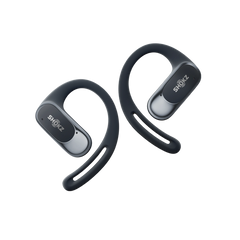
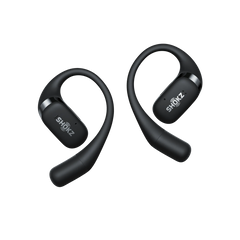
The Shokz OpenDots 2 is a strong option worth considering if your main concerns are comfort, stability, and ease of positioning. Its open-ear clip-on design means the earbuds sit on the ear rather than sealing the ear canal, so you can focus on finding a secure position without the blocked-ear feeling that some traditional earbuds create.
This matters because wearing clip-on earbuds securely isn't just about clipping them on and hoping they stay put. The earbud needs to feel balanced, sit comfortably against the ear, and keep the speaker naturally aligned towards the ear canal. The OpenDots 2 uses contoured silicone and a flexible JointArc™ design to help the earbuds adapt to different ear shapes and sizes, which can make the fit feel more natural during longer wear.
The open-ear design also suits the way many people use clip-on earbuds in real life. Whether you're walking, commuting, working, or moving between tasks, you may still want to hear your surroundings while listening. The OpenDots 2 keeps the ear open, helping you stay more aware of what's happening around you without giving up your audio.


So, if you've read this guide because you want to learn how to wear clip-on earbuds more securely, the OpenDots 2 is worth considering for the same reason: it focuses on the practical fit details that matter most, including comfort, stability, and a clip-on design that's easy to position correctly.
Final Thoughts
Getting your clip-on earbuds to sit right changes everything. Taking those extra few seconds to adjust them properly means you won’t be dealing with a slipping bud or that nagging ear ache half an hour later. It’s the difference between a frustrating workout and one where the music just flows.
If you follow the five steps we've covered and keep an eye out for those early warning signs of a bad fit, you’ll be sorted. If you’re still on the hunt for a pair, something like the Shokz OpenDots 2makes life a lot easier, as the design itself does most of the hard work for you. At the end of the day, your ears and your music deserve a bit of extra care, getting the fit spot on is always worth the effort.
Frequently Asked Questions
1. Do Clip-On Earbuds Fall off When Running?
Not if they’re worn correctly. The trick is to anchor the clip on the firmer part of your ear, rather than letting it sit only on the soft lower area. Shokz OpenDots 2 helps with this through its open-ear clip-on design, contoured silicone, and flexible JointArc™ design, which support a stable, comfortable fit across different ear shapes. Give your head a quick shake after putting them on. If they stay steady, you’re good to go.
2. Should Clip-On Earbuds Feel Tight?
Definitely not. They should feel secure, but they shouldn't pinch. If your ears start to throb after twenty minutes, try faffing with the angle. A good fit uses friction to stay in place, not raw clamping force. If they dig in, they're probably too stiff for your ear shape.
3. Why Is One Earbud Quieter Than the Other?
Nine times out of ten, it's just the positioning. If one side is even a tiny bit further from your ear canal, the sound goes wonky. Try shifting the quiet one around first. If that doesn't work, check the speaker grille for bits of fluff or wax, a quick clean usually does the trick.
4. Why Do They Sound Quieter Than Traditional In-Ear Buds?
That’s by design. Since models like the Shokz OpenDots 2don't plug your ear, you’re always going to hear the world around you. It’s a massive win for staying safe on busy roads, to be fair. You might need to nudge the volume up at first, but you'll get used to the open feel in no time.
5. Are Shokz OpenDots 2 easy to wear correctly?
Yes. Shokz OpenDots 2uses an open-ear clip-on design, so you simply need to clip it securely on the ear and keep the speaker aligned towards the ear canal. Its lightweight build, contoured silicone, and flexible JointArc™ design help support a comfortable, stable fit across different ear shapes.